Written by
Publish Date
Category
Video Marketing Tips
Online education has exploded in the last decade. From fitness trainers to startup mentors, everyone is packaging their knowledge into courses. But here’s the truth: in today’s market, content alone doesn’t sell. Video has become the new salesperson.
Think about it. When someone lands on your page, they don’t want to scroll through endless text. They want to see you, hear your voice, and feel your energy. Video makes that connection possible. It builds trust faster than a PDF ever could.
But here’s where most founders and coaches stumble: they record hours of solid content, then upload it raw hoping it will sell. The problem? Unedited video doesn’t convert. Audiences lose interest, messages get buried, and call-to-actions fall flat. You end up with great knowledge… but disappointing sales.
The good news? That’s not your fault. It’s a system problem. Editing is the missing link — the part that transforms your raw message into a polished sales tool. Done right, video editing can turn a casual viewer into a paying student.
That’s exactly what this guide will show you. Step by step, we’ll break down how to use editing techniques to boost conversions, build trust, and sell more courses.
By the end, you won’t just know how to “make videos.” You’ll know how to edit videos that actually sell.
Why Video is the #1 Sales Tool for Founders & Coaches
If you’re a founder or a coach selling an online course, your biggest challenge isn’t usually the content. Most of you already know your material inside out. The real challenge is getting people to buy. And in today’s digital landscape, nothing sells better than video.
Video has quietly replaced the traditional salesperson. Instead of booking dozens of sales calls or sending endless DMs, your videos can do the heavy lifting for you — building trust, creating authority, and making your offer irresistible 24/7. Let’s break down why.
1. The Psychology of Video: Trust, Authority, Relatability
Humans are wired to connect with faces and voices. Long before the internet, people trusted eye contact and tone of voice over text. That hasn’t changed.
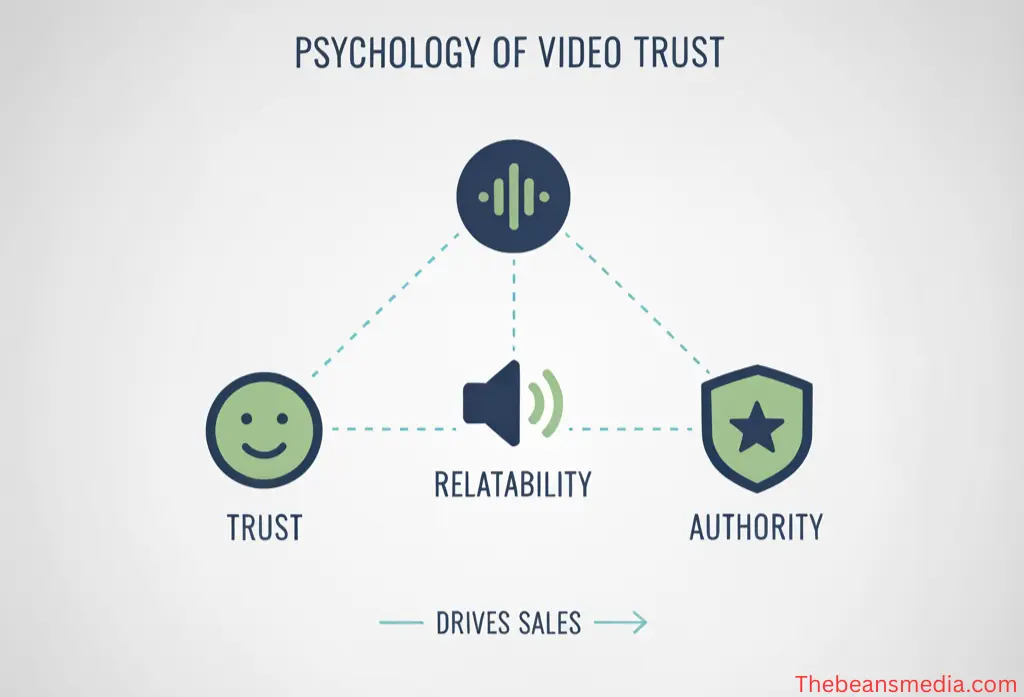
Trust: When your audience sees you on camera, speaking confidently and looking them in the eye, their brain processes it as a human interaction. They feel like they “know” you, even if you’ve never met.
Authority: Video editing can highlight your expertise. Simple elements — like a clean background, professional transitions, and on-screen text — instantly make you look more credible. Authority isn’t just about what you know; it’s about how you present it.
Relatability: A polished video still needs to feel real. Cutting in behind-the-scenes clips, client stories, or subtle humor makes you relatable. And relatability is what converts browsers into buyers.
In short, a well-edited video makes people trust you, believe in your authority, and feel connected enough to buy. No sales script can compete with that.
2. Stats: Why Video Converts Better Than Text
Don’t just take it from psychology — the numbers back it up.
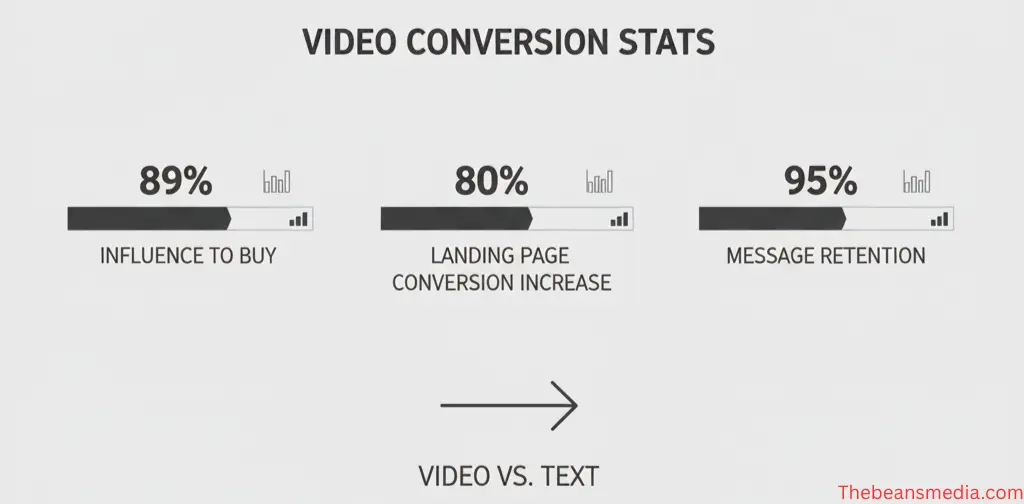
According to Wyzowl’s 2024 report, 89% of people say video convinced them to buy a product or service.
HubSpot found that landing pages with video can increase conversions by up to 80%.
Viewers retain 95% of a message when it’s delivered in video, compared to just 10% in text.
Social media platforms like Instagram and TikTok prioritize video content in their algorithms — meaning your videos naturally get more reach than static posts.
If you’re still relying mostly on text posts, blogs, or raw unedited webinars to sell your course, you’re leaving money on the table.
3. Why Raw, Unedited Video is Not Enough
Now, you might be thinking: “I’m already making videos. Isn’t that enough?”
Here’s the problem: attention spans are shrinking. People swipe away in seconds if your video feels too slow, confusing, or unpolished. Raw video, no matter how valuable, often fails because:
The hook is weak: If your first 5 seconds don’t grab attention, viewers leave.
Pacing is off: Long pauses, filler words, or slow explanations kill momentum.
No call-to-action: Most unedited videos never direct the viewer to do something now.
Lack of visuals: Text overlays, graphics, and transitions aren’t decoration — they guide focus and reinforce your message.
Think of editing as the difference between having a conversation over coffee and delivering a TED Talk. Both can be authentic, but one is designed to inspire action.
4. Case Study: A Coach with Raw Videos vs. Polished Edited Videos
Let me give you a story that plays out in real life all the time.
A life coach I once worked with had been recording weekly YouTube videos for a year. She would set up her phone, hit record, and speak passionately about mindset and growth. Her content was solid — no question. But her videos were 20 minutes long, unedited, and full of pauses. Her subscriber base grew slowly, but course sales were almost flat.
We took one of her raw recordings and edited it professionally:
We opened with a punchy 5-second hook (If you’ve tried everything to stay consistent with your habits but still fail — here’s why it’s not your fault).
Cut out all filler words and long pauses.
Added text overlays to reinforce key points.
Inserted testimonial clips from past students.
Closed with a direct call-to-action pointing to her course.
The result? That single video did 3x the sales of her entire previous month’s uploads combined. Her students told her they felt like the message was speaking directly to them.
That’s the power of editing. The knowledge was always there — editing turned it into a conversion machine.
5. Why Founders and Coaches Can’t Ignore This Shift
If you’re building a business around courses, your audience isn’t comparing you to other small creators — they’re comparing you to the polished, high-budget videos they see daily on YouTube, Instagram, and Netflix. Expectations are higher than ever.
The harsh truth? If your videos look sloppy, people assume your course will be sloppy too. First impressions matter.
This doesn’t mean you need a Hollywood production. It means you need smart editing: clean visuals, clear storytelling, and calls-to-action that don’t feel forced. It’s the difference between looking like an amateur and presenting yourself as the go-to authority in your niche.
6. Where to Start?
If this feels overwhelming, you don’t have to do it alone. Many founders and coaches outsource editing so they can stay focused on teaching and scaling their business.
That’s where professional editing partners come in. At The Beans Media, we offer YouTube video editing services designed specifically for course creators, founders, and coaches. We don’t just “cut videos” — we structure them to convert viewers into buyers.
Imagine: instead of losing leads to sloppy editing, every video you post becomes a mini-salesperson that works on autopilot, growing your audience and boosting course sign-ups.
Video isn’t just a nice add-on anymore. For founders and coaches, it’s the #1 sales tool. And editing is what separates a video that gets ignored from one that fills your courses with new students.
Now that we understand why video is king, let’s dive into the specific editing strategies that transform ordinary recordings into high-converting sales assets.
The Role of Editing in Selling Courses
Most founders and coaches think editing is about trimming out mistakes or adding background music. But in reality, editing is the hidden sales engine behind every successful online course.
When done right, editing doesn’t just make your videos look good — it guides the viewer’s attention, builds emotion, and creates a natural path to your call-to-action. In other words, it doesn’t just deliver your message; it shapes it into a story that sells.
Editing = Not Just Cutting Clips, But Shaping a Sales Narrative
Imagine sitting in a movie theater. The raw footage of a film could be hours of actors repeating lines, awkward pauses, or multiple camera angles. Editing turns all that raw material into a story that makes sense, flows smoothly, and keeps you hooked until the end.
The same principle applies to your course-selling videos. Raw footage is just information. Editing transforms it into a narrative. It’s where psychology, marketing, and storytelling meet.
Without editing, your video is like a draft of a book: useful, but not persuasive. With editing, it becomes a page-turner that keeps your viewer glued until they’re ready to take action.
Core Editing Techniques That Drive Course Sales
So, what specific editing strategies make a video convert better? Let’s break them down.
1. Hook in the First 3 Seconds
The average online attention span is about 8 seconds — shorter than a goldfish. That means if your video doesn’t hook your audience in the first 3 seconds, they’ll scroll away.
Editing helps here by:
Cutting straight to the most powerful statement.
Adding bold on-screen text to highlight the problem you’ll solve.
Using quick cuts, sound effects, or motion to immediately grab attention.
Example: Instead of starting with “Hi, my name is Sarah, and I’m a business coach,” the video could open with:
If your course isn’t selling, it’s not your content — it’s your editing.
That’s a hook. Editing makes sure it lands.
2. Pattern Interrupts
Even if your content is great, long stretches of talking can feel monotonous. Viewers disengage. That’s where pattern interrupts come in.
A pattern interrupt is any editing choice that jolts the brain back into focus — like cutting to a different camera angle, zooming in slightly, inserting a graphic, or flashing a surprising stat on screen.
They don’t just make the video “flashy.” They reset attention, keeping viewers engaged long enough to hear your offer.
3. Social Proof (Testimonials & Reviews)
You can talk about how great your course is all day, but nothing sells like seeing other people succeed with it.
Editing lets you insert testimonials, screenshots of reviews, or even a quick montage of student wins. These clips act as social proof that your course works.
It’s one thing to say “my program helps people land clients.” It’s another to cut in a clip of a student saying:
“I closed three new clients within two weeks of joining this course.”
Good editing knows where to place these testimonials so they boost credibility without breaking the flow of your message.
4. Call-to-Action Editing (Clear, Persuasive CTAs)
Most raw videos end awkwardly: “Uh, so yeah, thanks for watching… check the link maybe?”
Editing fixes this by making your call-to-action (CTA) sharp and persuasive.
Adding animated arrows pointing to the signup link.
Showing the course logo or offer while you speak.
Ending with text that lingers on screen, reinforcing the CTA.
Instead of hoping viewers remember what you said, editing makes sure the action sticks.
5. Visual Hierarchy (Text, Graphics, Pacing)
Editing isn’t just about cuts — it’s about guiding the eye.
On-screen text highlights key takeaways.
Graphics illustrate complex points.
Pacing ensures your message never drags.
For example, When you mention “three steps,” the editor can flash bold “Step 1, Step 2, Step 3” graphics. This helps the brain organize information quickly, reducing cognitive load. When learning feels effortless, buying becomes easier.
Storytelling vs. Teaching: The Secret Ingredient
Here’s where most founders and coaches go wrong: they think their videos should teach. But in sales, teaching alone doesn’t convert. What converts is storytelling.
Teaching = Here’s what you should do.
Storytelling = Here’s what happened when someone like you tried this, and how their life changed.
Editing bridges the gap. It takes your teaching and wraps it inside stories, case studies, and emotional arcs. Instead of feeling like a lecture, your video feels like a journey.
For example, Instead of just teaching “How to write emails,” you cut in a story about a student who was struggling, show her progress screenshots, then close with the lesson. That blend of emotion + logic is irresistible.
Editing isn’t decoration. It’s not the final polish you slap on at the end. It’s the strategic process of shaping your video into a persuasive sales narrative.
When you approach editing this way, your videos stop being “lectures that people watch” and start becoming “stories that people act on.”
That’s how you turn viewers into students — and courses into thriving businesses.
Types of Videos Every Founder/Coach Needs
When you’re building and selling courses, not all videos serve the same purpose. A quick reel on Instagram won’t have the same impact as a long-form YouTube breakdown or a polished Video Sales Letter (VSL). Each video format plays a unique role in your sales funnel — from grabbing attention at the top, to converting leads into paying students at the bottom.
Here are the four types of videos every founder or coach should focus on — and how smart editing makes each one work harder for your business.
1. Video Sales Letter (VSL): Your Core Course-Selling Machine
If there’s one video that can make or break your course business, it’s your Video Sales Letter (VSL).
A VSL is essentially a sales page in video form. Instead of asking prospects to read long text, you present your offer through a structured, persuasive video. It blends storytelling, psychology, and editing techniques to build trust and trigger buying decisions.
Why It Matters:
People buy courses emotionally, then justify logically. A VSL captures both sides.
It creates the feeling of a one-on-one sales call — but works 24/7 on autopilot.
Editing Approach for VSLs:
Strong Hook: Start by addressing the audience’s pain point in the first 5–10 seconds.
Narrative Flow: Cut footage into a story arc (problem → solution → proof → offer).
Insert Social Proof: Add student testimonials, results screenshots, or video reviews.
Call-to-Action Focus: Editing ensures your CTA is highlighted multiple times throughout the video with graphics, on-screen buttons, or animations.
Visual Rhythm: Keep pacing sharp with pattern interrupts (zoom-ins, b-roll, text overlays) so the video never feels boring.
2. YouTube Videos: The Authority & Organic Growth Engine
While VSLs are your closer, YouTube videos are your traffic magnet. They build your audience, authority, and trust at scale.
Think of YouTube as your digital stage. Every video you post positions you as an expert in your niche, bringing warm leads into your ecosystem before you ever pitch them.
Why It Matters:
YouTube is the second-largest search engine in the world.
Long-form content creates deeper relationships compared to social media snippets.
Evergreen content keeps working for months or even years after posting.
Editing Approach for YouTube:
SEO-Driven Hooks: Edit intros to quickly match search intent (e.g., “How to Create Your First Course in 2024”).
Visual Storytelling: Add graphics, slides, or b-roll to explain concepts clearly.
Audience Retention: Cut filler, insert jump cuts, and use pattern interrupts to avoid drop-offs.
Subtle Promotion: Place your course CTA naturally at the end or mid-roll with edited animations.
When editing for YouTube, it’s not about flashy effects. It’s about clarity, pacing, and audience retention. If your average watch time is high, YouTube rewards you with more reach.
3. Reels, Shorts, and TikToks: Attention & Top-of-Funnel Awareness
The attention economy lives here. Short-form content is the fastest way to get noticed, stop the scroll, and drive traffic to your longer content or course funnel.
Reels, Shorts, and TikToks aren’t designed to sell directly — they’re designed to spark curiosity. They make people aware of you and move them to the next step (like subscribing or joining your email list).
Why It Matters:
Instagram Reels are shared 22% more often than regular videos.
TikTok is a discovery engine — where new audiences find you daily.
YouTube Shorts are now integrated with long-form channel growth.
Editing Approach for Short-Form:
Hook Immediately: The first 1–2 seconds are everything. Editing must front-load energy and visuals.
Dynamic Cuts: Fast-paced transitions, subtitles, zooms, and background music keep it engaging.
Text Captions: Since most people watch muted, editing captions is non-negotiable.
CTA Soft Placement: End with a light CTA — “Follow for more” or “Link in bio” — not a hard pitch.
This is where creative editing shines. Even if your raw footage is just a talking head, editing can transform it into scroll-stopping micro-content that drives awareness at scale.
That’s why we also provide shorts/reels editing services tailored for founders and coaches — so you don’t just post videos, you post content that spreads.
4. Ad Creatives: Paid Acquisition Done Right
When you’re ready to scale, ads are the lever. But here’s the catch: bad ad editing burns money.
Most coaches waste thousands running ads with videos that don’t grab attention or communicate value fast enough. Editing is the difference between a money pit and a money machine.
Why It Matters:
Ads compete in the noisiest space — you have seconds to stand out.
A/B testing different edited versions can double or triple ROI.
Smart editing ensures your ad feels native to the platform (so people don’t instantly skip).
Editing Approach for Ads:
Instant Hook: Start with a surprising line, stat, or question to break scrolling.
Benefit-Focused Cuts: Keep only the strongest, most emotional soundbites.
Social Proof Inserts: Quick testimonial clips or course results create credibility fast.
CTA Anchoring: End with a strong CTA aligned with your funnel — “Enroll now,” “Watch the free training,” or “Apply today.”
Editing for ads isn’t about long explanations — it’s about precision. Every frame must earn attention and lead toward action.
For course creators ready to scale ads, we offer ad video editing services that make every dollar of ad spend work harder.
Each of these video types has its place in your sales ecosystem:
VSLs close sales.
YouTube videos build authority.
Reels/Shorts/TikToks generate awareness.
Ad creatives scale growth.
The magic isn’t in recording them — it’s in editing them for their purpose. Editing is what transforms a talking head into a hook, a testimonial into proof, and a video into revenue.
Master (or outsource) the editing for these four video types, and your course sales pipeline runs like a machine.
How to Structure a Video Sales Funnel with Editing
Most course creators know they need “videos.” But the real power comes when you connect those videos into a sales funnel — a sequence designed to guide viewers step by step from stranger to paying student.
Editing is what makes this funnel work. The right pacing, tone, and visuals at each stage keep people moving forward until they’re ready to buy. Without editing, the funnel leaks; with editing, it flows.
The Video Journey: Awareness → Interest → Desire → Action
Every successful funnel follows the classic marketing path:
Awareness – Get on your audience’s radar.
Interest – Show them you understand their problem.
Desire – Prove you have the solution they want.
Action – Persuade them to enroll in your course.
Each stage requires a different type of video — and a different editing approach to fit the mindset of the viewer.
Funnel Videos Every Course Creator Needs
Let’s break down the essential funnel pieces and how editing brings them to life.
1. Lead Magnet Video (Awareness Stage)
This is usually a free training, a short masterclass, or a value-packed YouTube video. The goal isn’t to sell — it’s to attract attention and build trust.
Editing Approach:
Fast-paced cuts to maintain attention.
Clear titles and on-screen graphics to highlight key takeaways.
Upbeat tone, with music and visuals that energize.
End with a subtle CTA like “Download the free guide” or “Subscribe for more.”
The edit should feel light, engaging, and generous — you’re showing value upfront with no heavy sales pitch.
2. Webinar or Deep-Dive Video (Interest Stage)
Now that the audience knows you, it’s time to show them you understand their struggles and have real solutions. A webinar, deep-dive video, or extended YouTube session works here.
Editing Approach:
Clean pacing — remove long pauses, filler words, or technical hiccups.
Add supporting visuals: slides, graphics, stats.
Include short cuts of client examples to keep it relatable.
Strategic pauses, zoom-ins, or bold text to emphasize key learning points.
Here, the tone is educational but persuasive. You’re teaching while gently nudging them toward the next step.
3. Video Sales Letter (Desire Stage)
This is the heart of the funnel — your VSL. It’s designed to create emotional desire for your course and move people from “interested” to “ready to buy.”
Editing Approach:
Strong narrative arc (problem → empathy → solution → offer).
Insert testimonials and social proof clips.
Cut in visuals of the course, worksheets, or community.
Multiple CTA placements (subtle at first, stronger near the end).
Tighter pacing with fewer tangents — every second should serve the sale.
This video should feel personal, emotional, and high-stakes. Editing ensures it’s not a lecture — it’s a sales conversation that flows naturally.
4. Testimonial Reel (Action Stage)
At this point, your audience is close to buying but might be hesitating. A testimonial reel seals the deal.
Editing Approach:
Quick, energetic cuts between multiple success stories.
Add subtitles for clarity and impact.
Use upbeat background music to create an emotional lift.
Overlay results: “Closed 3 clients,” “Doubled income,” “Launched first course.”
The reel should feel like undeniable proof. Viewers see others just like them succeed and think, “If they can do it, so can I.”
Example: 5-Video Funnel Structure for a Course Creator
To put this together, let’s imagine a coach selling a productivity course:
Reel/Short (Awareness): 20-second tip about “why most people’s morning routine fails.” Edited with captions, music, and a snappy hook. CTA: “Watch the full free training.”
Lead Magnet Video (Awareness → Interest): A free 15-minute video, cleanly edited with titles and slides. CTA: “Sign up for the free webinar.”
Webinar (Interest): A 40-minute webinar, polished to cut filler and add visuals. Edited to keep momentum, with stories spliced in. CTA: “Enroll now for the full course.”
VSL (Desire): A 12-minute edited sales video — strong hook, polished testimonials, crisp pacing. Multiple CTAs: “Enroll today.”
Testimonial Reel (Action): A 2-minute montage of student results, tightly edited with music and text overlays. CTA: “Join them — enroll today.”
Each video is edited for its role — not every video sells directly, but together, they move a stranger down the funnel until buying feels natural.
Why Editing is the Glue of the Funnel
Without editing:
The lead magnet drags on.
The webinar feels too long.
The VSL loses emotional punch.
The testimonial reel looks unconvincing.
With editing:
Every video feels clear, professional, and intentional.
The pacing matches the audience’s mindset at each stage.
CTAs feel natural instead of forced.
The funnel flows seamlessly.
Closing Thought for This Section
Think of your sales funnel as a movie series. Each video is an episode, building toward the finale. Editing is what ensures the story holds together.
When you edit for awareness, interest, desire, and action — your funnel stops leaking and starts converting. And that’s when video truly becomes the engine behind your course sales.
Practical Editing Tips for Founders & Coaches
By now, you’ve seen how powerful editing can be for selling courses. But the big question is: how do you actually apply it?
Whether you’re editing yourself or hiring help, the goal is to create videos that don’t just look polished — they drive sales. Here’s a practical breakdown to guide you.
DIY vs Professional Editing: When to Outsource
Not every founder or coach needs to outsource editing from day one. But knowing when to do it can save you time, energy, and lost revenue.
DIY Editing Works Best If:
You’re just starting and testing your first course idea.
You enjoy learning tools and have the time to practice.
Your priority is speed over polish.
Professional Editing Makes Sense If:
You already have paying students and want to scale.
Your videos represent your brand authority and sloppy edits could hurt you.
You’re spending 10+ hours per week editing instead of coaching, creating, or marketing.
👉 Think of editing like bookkeeping. You can do it yourself, but at a certain point, outsourcing frees you to focus on what you’re best at.
Essential Editing Tools for Founders & Coaches
You don’t need to become a Hollywood editor. Start with tools that balance power and simplicity.
Descript – Perfect for beginners. Edit by editing the transcript, not the timeline. Great for cutting filler words, adding captions, and repurposing content.
CapCut – Ideal for reels and short-form. Fast, template-driven, with auto captions.
Final Cut Pro (Mac) – Professional-grade, with speed and smooth workflow for Apple users.
Adobe Premiere Pro (Mac/Windows) – Industry standard for pro editing. Best if you want full control and plan to outsource later (since most pros use Premiere).
Pro Tip: Even if you outsource, it helps to know the basics. That way you can give clear feedback and avoid communication gaps.
How to Batch Content for Efficiency
One of the easiest editing hacks isn’t technical — it’s batching.
Instead of recording one video at a time, founders and coaches who succeed record content in blocks. For example:
Record 5 YouTube videos in one afternoon.
Slice them into 20 shorts/reels.
Repurpose clips into ad creatives or teasers.
Editing becomes faster when you process in batches. You (or your editor) can apply the same branding, captions, and effects across multiple videos at once.
This means instead of constantly “starting from scratch,” you’re producing weeks of content in one workflow.
Mistakes to Avoid in Course-Selling Videos
Editing mistakes can quietly kill conversions, even if your content is good. Watch out for these common pitfalls:
Over-Editing – Too many effects, transitions, or background sounds distract from your message.
Slow Pacing – Long pauses, tangents, or weak openings cause viewers to drop off early.
Weak CTAs – Ending without a strong, clear call-to-action means your video doesn’t convert, no matter how valuable it was.
Ignoring Captions – Many viewers watch muted. No captions = lost engagement.
Inconsistent Branding – Switching fonts, colors, or music confuses viewers and makes your content feel less professional.
Remember: editing is there to enhance your message, not overshadow it.
Editing Checklist for Sales-Driven Videos
Here’s a simple checklist you can use (or hand to your editor) before publishing any video:
Hook in first 5 seconds (question, bold statement, or problem callout).
Trim filler (remove “ums,” long silences, tangents).
Add captions for accessibility and silent viewers.
Insert visuals/graphics to highlight main points.
Include social proof (testimonial clips, student results).
Polished audio (clear voice, balanced background music).
Call-to-action (on-screen + spoken).
Consistent branding (fonts, colors, logo placement).
If your video checks all these boxes, you’ve got a piece of content that doesn’t just inform — it sells.
At the end of the day, editing is a skill and a strategy. Founders and coaches don’t need to master every tool — but they do need to master the mindset: every video is an opportunity to build trust and drive action.
Start small if you need to. Use Descript or CapCut for your early videos. But as your business grows, recognize that outsourcing to professionals can multiply your ROI.
Scaling with Professional Video Editing Services
At some point, every founder or coach hits the same wall: you can only do so much on your own. Recording content, running ads, building your community, serving students — and then trying to edit every video on top of it? That’s a recipe for burnout.
This is where professional video editing services change the game.
Because here’s the truth: raw content educates, but edited content converts. And when your edits are guided by strategy, every video becomes a silent salesperson for your course.
Why Working with a Professional Editor Saves Time & Increases ROI
Editing is not just “technical.” It’s strategic. A professional editor knows how to:
Cut out filler without losing flow.
Add graphics, text, and music that enhance persuasion.
Structure a video so it keeps attention and leads naturally to a CTA.
Deliver consistent branding across all your videos.
When you outsource editing, you’re not just buying back hours. You’re investing in videos that actually convert better — meaning your ROI grows.
For example: If your raw video converts at 1%, and a polished, strategically edited version converts at 3%, you’ve tripled your revenue on the exact same content. That’s what professional editing delivers.
The Hidden Cost of Doing It Yourself
On the surface, DIY editing feels cheaper. But if you factor in the real cost, it’s often more expensive:
Time Cost: Spending 10 hours editing a video is 10 hours not spent coaching, creating, or marketing. What’s your hourly value as a founder? $50? $100? More?
Opportunity Cost: Every sloppy video that underperforms leaves potential sales on the table.
Energy Cost: Editing can be draining. The more time you spend stuck in timelines and export settings, the less creative energy you have for your actual business.
Doing it yourself might save dollars today but could cost you thousands in lost sales tomorrow.
How Agencies Like The Beans Media Help Founders Scale Faster
At The Beans Media, we work specifically with founders, coaches, and course creators. We know your challenges: you don’t just need videos that “look good.” You need videos that sell.
Here’s how agencies like ours help you scale:
Strategic Editing: Every cut, overlay, and effect is chosen with sales psychology in mind.
Multi-Format Delivery: We edit once, then repurpose for YouTube, Reels, TikTok, and ads — so you get more mileage from every recording.
Consistent Branding: Colors, fonts, intros, and outros match your brand, making your content recognizable and professional.
Speed: Instead of waiting weeks, you get a reliable workflow that keeps your content machine running.
When editing becomes a system instead of a chore, you can finally focus on your genius zone: teaching and growing your business.
Success Story: Raw to Revenue
One of our clients, a fitness coach, used to record long, unedited YouTube videos and occasional reels. They had great content but struggled to grow beyond 20 course sales a month.
After partnering with us:
We turned their 40-minute raw webinar into a 10-minute VSL with a sharp hook and strong CTA.
Edited testimonial reels from student feedback.
Repurposed long-form YouTube content into a series of shorts and ads.
The result? Their monthly sales jumped from 20 to over 70 within 90 days — without changing their content, only how it was presented.
Editing didn’t just improve their videos — it scaled their business.
If you’re ready to stop wasting time on editing and start scaling with high-converting videos, working with a professional partner can make all the difference.
At The Beans Media, we help founders and coaches turn raw recordings into strategic, sales-driven videos — from VSLs to YouTube content, reels, and ads.
Conclusion: Video Editing is the Hidden Sales Weapon
At the end of the day, selling courses online isn’t just about having knowledge or recording videos. It’s about how those videos are shaped, structured, and presented.
Editing is not decoration. It’s not just trimming mistakes or adding music. It’s the difference between a video that gets ignored and a video that sells.
Throughout this guide, we’ve seen how editing transforms every stage of your course business:
It turns raw recordings into Video Sales Letters that close deals.
It makes your YouTube content engaging and binge-worthy.
It transforms reels and shorts into awareness magnets.
It sharpens ad creatives into scalable revenue drivers.
And most importantly, it makes your entire sales funnel flow smoothly from awareness to action.
In short, editing is your silent salesperson. It works 24/7, converting viewers into students while you focus on teaching and growing your business.
Motivation: Every Founder and Coach Can Multiply Sales
Here’s the good news: you don’t need Hollywood budgets or a massive team. With the right editing strategy, any founder or coach can multiply their sales.
Treat editing as a sales strategy, not a technical afterthought. Every cut, graphic, and caption is an opportunity to guide attention, build trust, and spark action.
If you’re just starting, simple tools like Descript or CapCut can give you leverage.
If you’re scaling, professional editing ensures your videos match the quality and authority of your brand.
No matter where you are in your journey, editing is the one lever you can pull that instantly improves conversions without rewriting your content or remaking your course.
The knowledge you have is already powerful. Editing is what unlocks its full potential.
If you’re serious about scaling your course business, don’t carry the editing burden alone. A professional editing partner can free up your time, sharpen your message, and ensure every video is engineered to convert.
Ready to turn your raw footage into a sales machine? Explore our talking head video editing service built specifically for coaches and founders.